



To clean a clogged earbud mesh safely without pushing earwax into the internal driver, detach the silicone ear tips and wash them separately with mild dish soap and water, hold the nozzle facing downward, and gently wipe or lift debris outward using a soft dry cotton swab, a soft-bristled brush, or adhesive putty. Never poke sharp tools into the nozzle, and avoid soaking cloth meshes or non-water-resistant earbuds in rubbing alcohol or water.
When one earbud suddenly sounds much quieter than the other, the acoustic mesh screen covering the nozzle is usually the first place to inspect. Even a thin film of earwax, sweat, skin oils, or pocket lint across that microscopic screen blocks high-frequency detail and disrupts the air pressure seal inside your ear canal. However, cleaning an earbud mesh the wrong way—by scrubbing wet solvents into a woven fabric screen or digging at hardened wax with a toothpick—can turn a simple surface blockage into permanent driver damage.
Below, we break down how to identify whether your earbuds use a perforated metal grille or a woven cloth mesh, walk through Bose’s official dry-cleaning and adhesive-lift workflow, share community moisture-troubleshooting checks from r/headphones, and explain how to care for everyday true wireless sets like the EARSOLE Smart Wireless Earbuds with LCD Touchscreen Case.
Why Clogged Earbud Mesh Makes One Side Sound Quiet (And Metal vs Cloth Mesh Differences)
Every in-ear headphone relies on an unobstructed acoustic nozzle to transfer sound waves from the internal transducer into your ear canal. According to Bose’s official maintenance guide (How to Clean Earbuds and Charging Cases the Right Way), regular use during commuting, travel, or workouts creates a buildup of earwax, sweat, natural skin oils, dust, and dirt. Bose explains that dirty earbuds do more than look unpleasant—they directly degrade audio performance, and keeping your earbuds clean helps maintain the optimal pressure in the ear canal required for clear, balanced sound quality.
When debris coats the mesh screen at the tip of the nozzle, two things happen simultaneously:
- Acoustic damping and high-frequency roll-off: Sound waves must pass through hundreds of tiny perforations or fabric pores in the nozzle screen. When wax seals those pores, treble and upper-midrange frequencies are absorbed first, making the affected earbud sound underwater, distant, or nearly silent compared to the clean side.
- Altered ear-canal pressure: In-ear monitors and active noise cancelling (ANC) earbuds depend on predictable airflow across the nozzle damper and front vent. When buildup blocks the nozzle, ear-canal pressure shifts, which can make bass feel uneven or make one ear feel plugged.
Perforated Metal Grille vs. Woven Cloth Mesh: Why Material Matters
Before touching the screen with any cleaning tool, inspect the nozzle opening under a bright light. As an earbud owner in Reddit’s r/headphones community (thread mlo6r8, discussing JBL Tune 110 BT in-ear headphones) pointed out, countless video tutorials demonstrate cleaning methods on a rigid metal grid, whereas many earbuds actually use a woven cloth-like mesh that absorbs earwax into the fibers.
Treating a woven fabric mesh like a stamped stainless-steel or aluminum grille is one of the most common mistakes in earbud maintenance:
- Perforated metal grilles are rigid plates etched with tiny holes. Earwax sits on top of the metal surface or bridges across the holes. Dry brushing and adhesive putty can lift dried debris off the rigid face without deforming the screen, provided you do not press hard enough to collapse the plate into the nozzle.
- Woven cloth or fabric meshes act like tiny acoustic filters held in place by a thin ring of perimeter adhesive. Because woven fibers are porous, warm earwax and skin oils wick into the cloth weave. If you flood a cloth mesh with liquid rubbing alcohol or scrub it aggressively with a wet swab, dissolved wax can migrate straight through the fabric into the acoustic chamber—or the solvent can weaken the glue holding the cloth screen to the nozzle rim.
| Component / Mesh Type | Physical Structure | How Earwax & Oils Interact | Safe Cleaning Method (Bose & Community Guidance) | High-Risk Mistakes to Avoid |
|---|---|---|---|---|
| Perforated Metal Nozzle Grille | Rigid metal plate with precision-drilled micro-holes at the nozzle tip | Wax forms a crust across the outer face or plugs individual perforations | Hold nozzle downward; wipe gently with a soft dry cotton swab; dab adhesive tape or putty to pull stuck gunk outward; brush lightly with a dry soft-bristled brush | Poking needles, pins, or toothpicks through the holes; pressing hard enough to unseat the metal grille |
| Woven Cloth / Fabric Mesh | Fine acoustic fabric screen bonded to the nozzle lip with adhesive (r/headphones thread mlo6r8) | Porous fibers absorb warm earwax and oils; moisture can wick into the weave | Use gentle outward dabs with adhesive putty or tape; brush lightly with a dry soft-bristled brush; run a 24-hour silica gel desiccant check if moisture is suspected | Soaking with rubbing alcohol (several manufacturers warn against alcohol per Bose); scrubbing wet wax deeper into the cloth |
| Detachable Silicone Ear Tips | Flexible soft silicone domes that seal the ear canal and shield the nozzle | Collects the majority of sweat, skin oils, and earwax before it reaches the mesh | Detach completely from the earbuds; wash in warm water with a small amount of mild dish detergent; air-dry 100% before reattaching (Bose) | Washing tips while still attached to the earbuds; reattaching damp tips that trap moisture against the mesh |
| Charging Contacts & Case Interior | Exposed metal pogo pins, magnetic wells, and case housing (including LCD touchscreen cases) | Skin oils and dust oxidize or coat contacts, interrupting charging and case wake-up | Wipe earbud contacts with a dry cotton swab; brush charging port with a dry soft-bristled brush; wipe exterior and screen with a dry lint-free microfiber cloth | Getting water inside the charging port (Bose calls this a major hazard) or spraying liquid cleaners onto a touchscreen case |
Step-by-Step: Cleaning Silicone Ear Tips, Nozzle Mesh, and Charging Contacts
Bose recommends thoroughly cleaning your earbuds at least every two months—or more frequently depending on how much you wear them—paired with a quick wipe-down after every listening session. You do not need specialized repair instruments; ordinary household items work safely when used in the right order.
For a broader overview of routine case and housing upkeep, see our companion guide on how to clean earbuds and charging cases. When you specifically need to clear a clogged acoustic mesh screen, follow this five-step sequence.
Step 1: Set Up a Flat Work Surface and Gather Delicate Tools
According to Bose, you should always clean electronics over a flat, well-lit surface—you may be surprised by how much dried debris drops off the nozzles, and working over a table makes it easy to wipe the surface clean with a wet rag or towel afterward.
Gather these gentle household supplies before you begin:
- Soft, dry cotton swabs
- A clean, dry soft-bristled brush or soft toothbrush
- Adhesive tape or mounting/cleaning putty
- Mild dishwashing liquid and clean water (strictly for detached silicone ear tips)
- Two lint-free microfiber cloths
- Optional: Canned air (for loose surface dust) and a dental floss pick (strictly for exterior shell crevices, never inside the nozzle)
Step 2: Detach and Wash Soft Silicone Ear Tips Separately
Never attempt to clean the acoustic mesh through the hole of an attached ear tip. Per Bose’s instructions, carefully detach the removable ear tips (and any stability bands) from the earbuds first.
- Peel the silicone flange back and pull the tip straight off the nozzle collar so you do not tear the silicone stem.
- Wash the detached silicone tips in water mixed with a small amount of mild dishwashing detergent to dissolve body oils and wax residue.
- Rinse the detached tips thoroughly with clean water and set them on a dry lint-free cloth.
- Wait until the tips are completely dry before reattaching them. Putting a slightly damp silicone tip back onto an earbud traps humidity directly over the acoustic mesh.
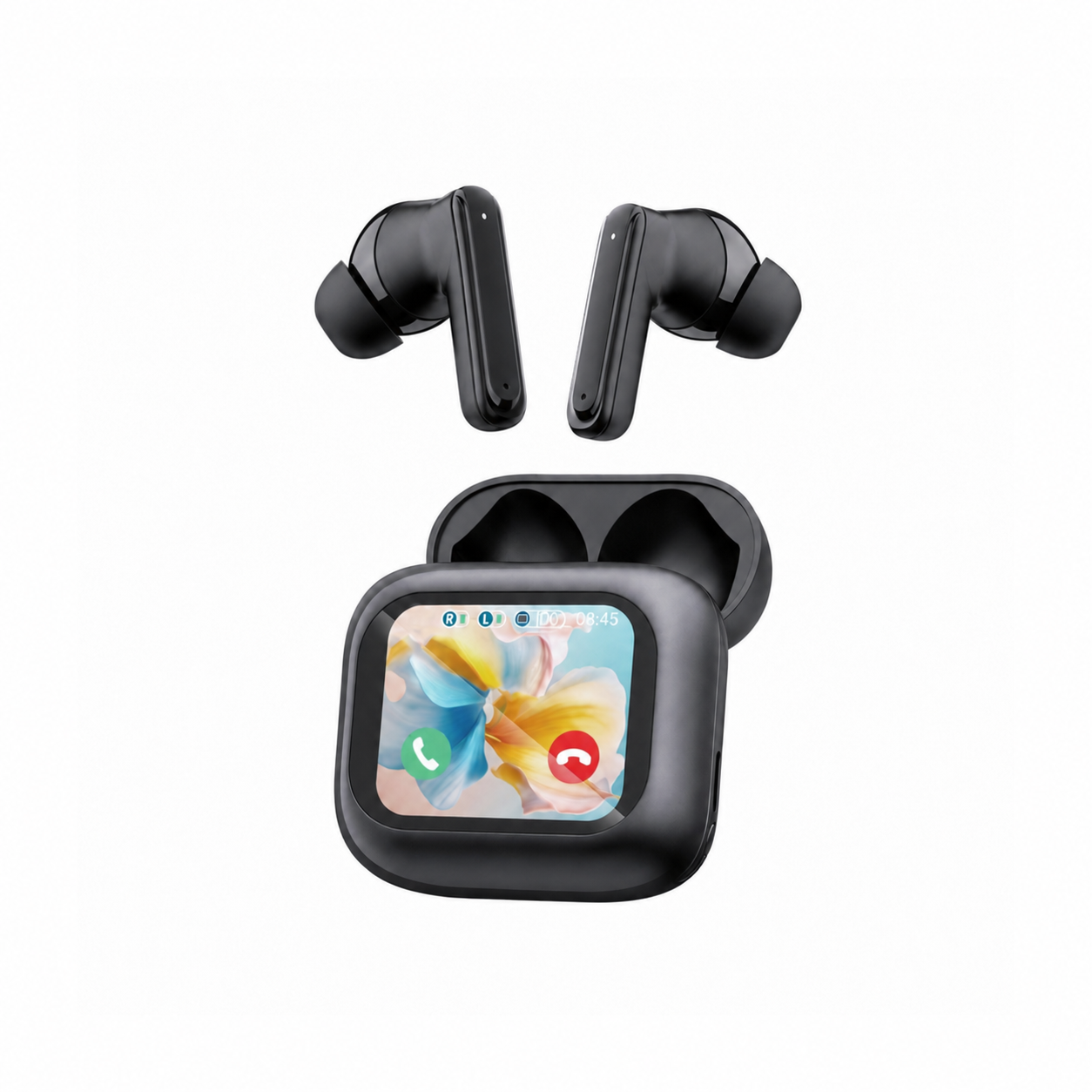
Removable tips are your primary defense against nozzle clogs. For example, the listing for the EARSOLE Smart Wireless Earbuds with LCD Touchscreen Case (EAR-LCD54-BLK-01, $49.99) specifies an in-ear sports design with soft silicone tips, Bluetooth 5.4, and ANC + ENC noise reduction. Because the listing explicitly notes that no water-resistance rating is listed for this model, detaching the soft silicone tips allows you to wash the ear-contact parts hygienically in soapy water while keeping the electronic earbud housings completely away from moisture.
Step 3: Wipe the Earbud Nozzle Exterior with a Dry Cotton Swab
With the silicone tip removed, the acoustic nozzle and its mesh screen are fully exposed. Hold the earbud gently between two fingers with the nozzle pointing straight down toward your table so gravity pulls loosened particles away from the internal driver rather than deeper inside.
- Follow Bose’s core rule for nozzle care: gently wipe the earbud nozzle using a soft, dry cotton swab, and do not insert cleaning tools into the nozzle.
- Glide the dry cotton swab around the outer lip and collar of the nozzle where the silicone tip latches on. Wax frequently collects in this outer ridge and migrates across the edge of the mesh.
Step 4: Lift Stuck Earwax Outward Using Adhesive Tape, Putty, or a Soft Brush
If earwax has crusted over the mesh perforations or embedded itself in the surface texture, wiping sideways with a cotton swab can smear the wax across clean pores. Instead, use an outward-lifting motion:
- Adhesive tape or putty pull: Bose notes that using a piece of adhesive tape or putty is a great way to pull out stuck gunk. Press a clean piece of adhesive putty or a folded loop of tape gently against the mesh face and peel it straight back. The tackiness bonds to surface wax and lifts it outward out of the mesh holes instead of compacting it inward.
- Dry soft-bristled brush sweep: Holding the nozzle facing downward, lightly flick across the mesh screen with a dry, soft-bristled brush to dislodge dry flakes so they fall onto your table.
- Canned air for loose dust: Bose mentions that canned air can knock out loose dust or particles—if you use it, hold the can well back and angle the airflow across the exterior rather than blasting high-pressure air straight into the nozzle opening.
- Exterior crevices only: Bose notes that the pointed end of a dental floss stick can reach hard-to-reach crevices on the housing, but stresses taking extra care not to dig in too deep and damage internal parts. Never poke a floss pick, pin, or toothpick into the nozzle mesh itself.
Step 5: Wipe the Earbud Shell, Charging Contacts, and Case Dry
Once the nozzle mesh is clear, finish by cleaning the surrounding housing and charging case so loose debris does not transfer right back onto the tips:
- Earbud exterior: Per Bose, hold the earbud gently between two fingers, put a tiny dab of water on a lint-free cloth, and wipe the exterior shell while remaining vigilant to avoid getting water into any openings. Immediately dry the shell completely with a second dry lint-free cloth.
- Earbud charging contacts: Wipe the metal charging contacts on the earbuds with a dry cotton swab.
- Charging case interior and port: Bose advises wiping the outside of the charging case with a lint-free cloth, using a dry soft-bristled brush to clean the charging port (getting water into the charging port is a strict no-no), and using a dry toothbrush to gently scrub the inside wells of the case to loosen stuck debris.
- Touchscreen charging case care: If you use a smart case such as the EARSOLE Smart Wireless Earbuds with LCD Touchscreen Case—whose listing describes a full-color LCD touchscreen charging case with Chinese and English interface menus that manages music, adjusts volume, handles incoming calls, and navigates settings directly from the case—keep all liquids away from the display seams and USB port. Use a dry microfiber cloth to buff fingerprints off the full-color LCD touchscreen and a dry cotton swab to keep the internal charging pins clean.
What to Avoid: Rubbing Alcohol Warnings, Sharp Tools, and Trapped Moisture Checks
Many well-meaning home remedies shared on social media can permanently ruin a pair of earbuds. When cleaning a delicate acoustic mesh, knowing what not to do is just as important as the cleaning sequence itself.
1. Why Several Manufacturers Warn Against Rubbing Alcohol
A common question in audio forums is whether soaking a cotton swab in isopropyl (rubbing) alcohol will dissolve stubborn earwax faster. In its official cleaning guide, Bose explicitly cautions: while some online instructions recommend using rubbing alcohol or alcohol wipes, several manufacturers actually warn against using alcohol to clean your earbuds.
Why is rubbing alcohol risky around an earbud nozzle?
- Adhesive breakdown: Most earbud nozzle grilles—whether perforated metal or woven cloth—are secured to the plastic or metal acoustic tube by a thin ring of pressure-sensitive or cyanoacrylate adhesive. Liquid alcohol can soften or dissolve that glue, causing the mesh screen to slip sideways or fall inside the nozzle.
- Wicking wax into cloth fibers: As highlighted by the
r/headphonesuser in threadmlo6r8whose cloth mesh had absorbed earwax, wetting wax on a woven fabric screen turns semi-solid wax into a thin liquid solution that wicks through the cloth and coats the acoustic damper or driver membrane underneath. - What about electrical contact cleaner? In
r/headphones(threadmlo6r8), commenterRatherNopesuggested that before considering alcohol, some hobbyists use a residue-free electrical contact cleaner (such as the one made by WD-40) because it is formulated to remove soil from electronic components and evaporates without leaving residue or dripping into the housings. However, even with fast-evaporating cleaners, spraying liquid directly into a nozzle carries the risk of flushing dissolved wax past the screen or loosening mesh glue. Sticking to Bose’s dry cotton swab, soft-bristled brush, and adhesive putty pull method remains the safest first-line approach.
2. Never Insert Sharp Tools or Submerge Non-Water-Resistant Earbuds
Bose emphasizes two non-negotiable rules for protecting earbud electronics: do not insert cleaning tools into the nozzle, and do not submerge your earbuds in water (including accidentally leaving them in laundry pockets).
Pushing a needle, safety pin, paperclip, or wooden toothpick into the nozzle mesh can puncture the fine acoustic damping screen or bend a metal grille inward against the speaker diaphragm. Equally important, never hold earbuds under a faucet to rinse the mesh. As noted in the store listing for the EARSOLE Smart Wireless Earbuds with LCD Touchscreen Case, no water-resistance rating is listed for this model—meaning you should wipe sweat off with a cloth after workouts, keep the earbuds and LCD touchscreen case out of the rain, and limit water washing strictly to the detached soft silicone tips.
3. The 24-Hour Silica Gel Desiccant Test When One Earbud Stays Muffled
What if you carefully clean the silicone tip and lift all visible earwax from the mesh, yet one earbud still sounds barely audible?
In r/headphones (thread mlo6r8), a community member pointed out a frequent hidden culprit: trapped moisture. Sweat from a workout, humid air, or condensation inside a warm ear canal can saturate a woven cloth mesh or form a microscopic water film across the internal damper, blocking sound just like earwax even when the mesh looks clean.
To rule out trapped moisture without applying heat (which can warp thin mylar driver diaphragms or degrade lithium-ion cells):
- Remove the silicone ear tips from the earbuds.
- Place the muffled earbuds inside a dry container or case alongside silica gel desiccant packets for a full day (24 hours), as suggested in
r/headphones(threadmlo6r8). - Keep the charging case open in a dry room away from direct sunlight or hair dryers.
- After 24 hours with silica gel desiccant, reattach your clean, dry silicone tips and test left-right volume balance.
| Troubleshooting Scenario | Likely Cause | Recommended Safe Action | Action to Avoid |
|---|---|---|---|
| Visible wax crust on a perforated metal grille | Surface earwax and dust blocking nozzle holes (Bose) | Hold nozzle facing down; wipe collar with a dry cotton swab; use adhesive tape/putty or a dry soft-bristled brush to pull gunk outward | Poking a toothpick or pin into the holes; rinsing the earbud under running water |
Woven cloth mesh looks dark or saturated (r/headphones mlo6r8) | Earwax and oils absorbed into fabric fibers | Gently dab outward with adhesive putty; brush lightly with a dry soft brush; avoid soaking with rubbing alcohol (Bose notes several manufacturers warn against alcohol) | Drenching the cloth mesh with rubbing alcohol or pressing wet swabs into the fabric |
| One earbud still sounds quiet after surface mesh cleaning | Trapped moisture or condensation behind the mesh (r/headphones mlo6r8) | Remove silicone tips and place earbuds in a container with silica gel desiccant for a day to draw out moisture | Using a hair dryer or heater, or assuming you need to rip the mesh screen off |
| Sweat buildup after a workout on non-rated earbuds | Moisture on silicone tips and housing exterior (EARSOLE listing notes no water-resistance rating is listed) | Detach soft silicone tips to wash with mild dish soap and water (dry completely); wipe earbud shell and charging contacts dry with a lint-free cloth | Submerging the earbuds or getting moisture into the LCD touchscreen charging case port |
Habits That Keep Earbud Mesh Screens Clean Longer
Preventing earwax from compacting into the nozzle screen takes less than ten seconds after each use:
- Wipe earbuds after every session: Bose notes that the easiest way to keep your earbuds clean is to keep your ears clean and give your earbuds a regular dry wipe after every use before body heat cools and hardens the wax.
- Always store earbuds in their charging case: According to Bose, storing earbuds inside their charging case—never loose in a backpack or pocket—protects the nozzles and silicone tips from pocket lint, dust, and accidental drops.
- Inspect silicone tips monthly: Because removable soft silicone tips (like those included with the EARSOLE Smart Wireless Earbuds with LCD Touchscreen Case) catch the bulk of earwax before it reaches the nozzle grille, washing and drying those detached tips every few weeks stops wax from overflowing onto the acoustic mesh.
Frequently Asked Questions
How do you clean a cloth mesh vs a metal mesh in earbuds?
As discussed in r/headphones (thread mlo6r8), a perforated metal mesh is a rigid grid where wax sits on the surface, whereas a woven cloth mesh can absorb earwax into its fibers. For both mesh types, follow Bose’s safe nozzle procedure: remove the silicone ear tips to wash and dry them separately, hold the earbud nozzle facing downward, gently wipe the exterior with a soft dry cotton swab without inserting tools into the nozzle, and use adhesive tape, putty, or a dry soft-bristled brush to pull debris outward. Avoid saturating a woven cloth mesh with liquid rubbing alcohol, which can wick dissolved wax deeper into the fabric or loosen perimeter glue.
Should you use rubbing alcohol or a toothpick on an earbud mesh?
No. In its official earbud care guide, Bose explicitly states not to insert cleaning tools into the earbud nozzle and notes that while some online tutorials suggest rubbing alcohol or alcohol wipes, several manufacturers warn against using alcohol to clean earbuds. Poking a toothpick, needle, or pin into the mesh can puncture the acoustic screen or damage the internal driver. Instead, use a soft dry cotton swab on the nozzle exterior and lift stuck debris outward with adhesive tape, putty, or a soft-bristled brush.
What if one earbud still sounds muffled after cleaning the mesh?
If you have cleaned the nozzle mesh with a dry swab, soft brush, and adhesive putty (per Bose) and one earbud still sounds quiet, community members in r/headphones (thread mlo6r8) recommend checking for trapped moisture by placing the earbuds in a container or case with silica gel desiccant for a day. Also make sure any washed silicone ear tips are 100% dry before reattaching them, and keep non-water-resistant models—such as the EARSOLE Smart Wireless Earbuds with LCD Touchscreen Case, which has no listed water-resistance rating—completely dry around all acoustic openings and charging ports.
