



When Bluetooth earbuds are turned off, tucked inside a closed charging case, or completely out of battery, their wireless radio cannot broadcast a live signal. Because no smartphone app can actively ping a dead or powered-down Bluetooth transceiver, your fastest recovery plan is a three-step sequence: check the last known location logged in your phone’s Find My Device app before the earbuds powered down, sweep nearby rooms with a real-time Bluetooth signal-strength (RSSI) scanner in case a loose bud is still awake on standby, and run a methodical zone-by-zone physical search of bedding layers, couch crevices, laundry pockets, and bag linings.
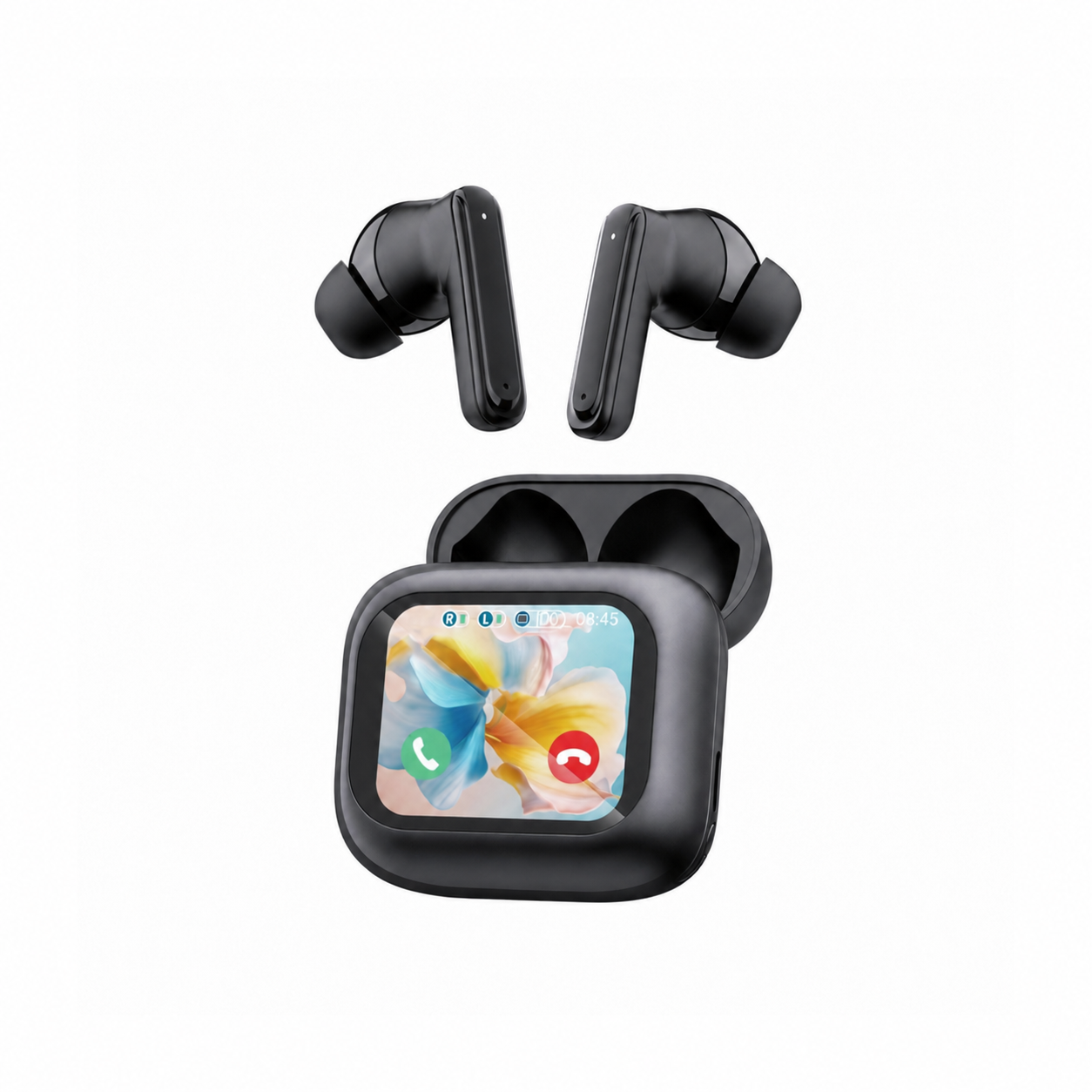
Many guides online promise secret tricks to “ping” powered-off earbuds from across the house. Relying on those claims wastes valuable time—especially if a single loose earbud is still sitting under a cushion with 10% battery left and will automatically shut down in a few minutes. Below, we break down the exact radio rules documented by Sony Support, community tested Bluetooth RSSI scanner tactics from r/androidapps, room-by-room search lessons from r/bluetooth, and everyday habits with visible charging cases like the EARSOLE Smart Wireless Earbuds with LCD Touchscreen Case that keep loose buds from disappearing in the first place.
Why Turned-Off or Dead Bluetooth Earbuds Can’t Broadcast a Live Signal (And What Find My Device Shows)
To understand what your phone can and cannot detect, it helps to separate historical location logs from live short-range radio pings. Standard true wireless earbuds do not contain cellular modems or continuous satellite GPS transmitters; they communicate strictly over short-range 2.4 GHz Bluetooth when their internal battery is supplying power to the radio chip.
According to Sony Support, locating lost Bluetooth earbuds or headphones with Google’s Find My Device app requires prior pairing and only tracks live location while the earbuds are powered on; if the earbuds are turned off or have run out of battery power, the app cannot actively ping them and instead displays only their last known location from before they powered down.
In its official troubleshooting guide (How to find my lost Bluetooth headphones or earbuds with Find My Device, Article ID 00348098), Sony Support outlines three important technical boundaries that apply when you open your phone to search:
- Prior pairing is mandatory: Sony Support notes that pairing is required before opening the Google Find My Device app for location purposes, that emitting locator sounds through Find My Device does not apply to headphones, and that Apple’s Find My app is not compatible with Sony headphones and earbuds. If you never paired the earbuds to your Android smartphone or tablet before losing them, the app has no device profile or location history on file.
- Last known location tells you where to start, not which cushion to lift: When your earbuds turn off—either because you placed them back inside their charging case and closed the lid, held the power-off sensor, or let the battery drain to 0%—Google’s Find My Device app displays the map pin from the last moment your smartphone was actively connected to them. That pin answers a critical question: Did I leave my earbuds at the gym or office, or did they disconnect inside my apartment?
- Closed charging cases cut off earbud Bluetooth radios: On nearly all standard true wireless stereo (TWS) earbuds, seating the buds onto the magnetic pogo pins and closing the charging case lid immediately disconnects the Bluetooth link and puts the earbuds into charging/powered-off state. Unless a case has its own independent beacon hardware, a closed case is invisible to live Bluetooth scans.
| Lost Earbud Scenario | Radio & Battery State | Can Find My Device Show Last Known Location? | Can a Live Bluetooth RSSI Scanner Detect It? | Best Immediate Recovery Action |
|---|---|---|---|---|
| Loose earbud outside the case with battery remaining | Powered on (connected or in standby/advertising state) | Yes, if previously paired to your compatible Android device (Sony Support) | Yes — RSSI scanner apps can read real-time signal strength as you walk closer (r/androidapps thread 1kg2bli) | Check Bluetooth connections immediately and sweep the room with a real-time RSSI scanner before auto-shutdown |
| Earbuds turned off or completely out of battery | Radio powered down; zero RF transmission | Last known location only from before the device turned off or its battery died (Sony Support) | No — powered-off or dead earbuds emit no Bluetooth signal (r/bluetooth thread w4si3t) | Open Find My Device to confirm the building/address where they last disconnected, then run a physical zone search |
| Both earbuds inside a closed charging case (or empty lost case) | Earbuds disconnected inside case; standard case has no active radio | Shows the last location where the earbuds disconnected when placed into the case | No — closed cases do not broadcast standard Bluetooth audio signals | Retrace your steps from the last disconnection timestamp and search pockets, bags, and bedding layers |
Are They Really Off? Testing With a Real-Time Bluetooth Signal Strength (RSSI) Scanner
Before assuming your lost earbuds are completely dead, ask one time-sensitive question: Did you lose them inside their closed charging case, or did one or both buds fall loose out of your ear or pocket?
If an earbud slipped out of your ear in bed, between sofa cushions, or under a car seat, it may still be powered on! Even if it is no longer playing music, a powered-on earbud either stays connected to your smartphone or enters a low-power advertising state for several minutes before its auto-off timer expires.
In r/androidapps (thread 1kg2bli) and r/bluetooth (thread w4si3t), users and app developers note that Bluetooth finder apps rely on real-time Bluetooth signal strength (RSSI) to home in on earbuds that are still powered on, whereas earbuds that are turned off, inside a closed case, or out of battery emit no signal—requiring you to check the last known location in Find My Device (per Sony Support) and physically search bedding, pockets, and bags.
How to Check If a Loose Earbud Is Still Awake
Run this two-minute radio check immediately before the earbud’s standby battery runs out:
- Check your phone’s paired Bluetooth menu first: Open your smartphone’s Bluetooth settings (if you need a refresher on how pairing and reconnection states appear, see our guide on how to connect wireless earbuds). Look at your saved devices list. If your earbuds still say Connected—or if tapping their name causes them to reconnect within 5 to 10 seconds—at least one earbud is outside the case, powered on, and within roughly 10 meters (30 feet) of where you are standing.
- Use Google’s Find My Device if supported and powered on: Per Sony Support, with the Bluetooth device powered on and paired, opening the Google Find My Device app on your Android smartphone or tablet and tapping your device in the list will locate it within a short distance (though Sony Support notes that emitting locator sounds through Find My Device does not apply to headphones).
- Walk the room with a real-time Bluetooth RSSI scanner: If the earbud is awake, a Bluetooth signal finder app (such as the Bluetooth Signal Finder tool discussed in
r/androidappsthread1kg2bli) measures Received Signal Strength Indicator (RSSI) in real time. Hold your phone at waist height and walk slowly through the room in a grid:- Pause for 3 to 4 seconds every few steps so the RSSI meter can update.
- Your body, thick mattresses, and metal furniture absorb 2.4 GHz radio waves. When the signal reading climbs stronger as you approach a couch corner, backpack, or laundry pile, narrow your physical search to that exact 3-foot radius.
- Quiet-room audio test (only if actively connected): If your phone shows the earbud is actively connected as a media output device and you are in a silent bedroom at night, play a steady mid-to-high-frequency audio track at a moderate volume and listen closely near pillows, blankets, and floor rugs. Stop immediately if the earbud does not connect, as playing audio through your phone speaker won’t help locate a disconnected bud.
How to Find a Lost Earbud Charging Case (And Prevent Losing Loose Buds Again)
What if your Bluetooth settings show Not Connected, RSSI scanners detect nothing, or you lost the entire charging case? At that point, radio physics is clear: there is no wireless signal to scan. You have to switch from digital tracking to a structured physical search.
In r/bluetooth (thread w4si3t), an earbud owner described losing a pair of disconnected SkullCandy DimeBlack headphones that had been on a bed and vanished even after stripping the bed and checking between the bed and the wall. That scenario is remarkably common—because compact black or dark-colored earbud cases and loose in-ear buds weigh only a few grams, they cling to folded fabric and travel into places a casual visual glance misses.
The 5-Zone Physical Recovery Checklist for Turned-Off Earbuds & Cases
Instead of tearing a room apart randomly (which often kicks a loose earbud deeper under furniture or bundles it inside sheets you pile on the floor), search these five high-probability zones in order:
- Zone 1 — Bedding layers, fitted-sheet corners, and pillowcases (The “Bed Trap”):
When you strip a bed to look for earbuds—just like the user in
r/bluetooththreadw4si3t—loose earbuds frequently stay trapped inside the folds of the duvet cover, tucked into the elastic pocket of a fitted sheet, or slipped inside a pillowcase opening. Shake out each blanket and sheet one by one over a clear hard floor, and run your hands flat across the mattress seams, headboard gap, and bedframe slats before putting the sheets back on. - Zone 2 — Laundry hampers, hoodie pouches, and pants pockets: Before checking the floor, check what you were wearing when Find My Device logged its last connection. Pat down the small coin pocket of jeans, jacket inner pockets, gym shorts, and the bottom of your laundry hamper. Always check pockets before starting the washing machine.
- Zone 3 — Couch cushions, recliner mechanisms, and throw blankets: Do not just look between sofa cushions—remove the cushions completely and sweep the fabric deck underneath with your phone’s LED flashlight held at a low, grazing angle. A low-angle flashlight beam casts a long shadow across a matte black earbud or silicone tip sitting on dark carpet.
- Zone 4 — Backpack linings, laptop sleeves, and car seat rails: Charging cases easily slide into the bottom seam of a backpack, an unzipped side pouch, or the gap between a car’s center console and the metal seat rail (where black plastic blends into black carpeting).
- Zone 5 — Eye-level surfaces and cluttered desks: Small charging cases often sit in plain sight next to black computer mice, chargers, coasters, or sunglasses cases. Scan tabletops at eye level rather than looking down from above.
Why Docking Earbuds in a Visible Smart Charging Case Prevents Future Loss
Once you recover your earbuds, the single best habit to prevent another “turned-off and lost in the sheets” hunt is never setting bare earbuds down on a bed, couch arm, or desk. Loose individual earbuds are tiny, roll off flat surfaces, and shut down once their small internal batteries drain. Placing them straight back into their charging case keeps the pair together in a larger, easier-to-spot housing.
Using a charging case that doubles as your desktop control center makes that habit much easier to stick to. The listing for EARSOLE Smart Wireless Earbuds with LCD Touchscreen Case states a full-color LCD touchscreen charging case that manages music, volume, calls, and settings, Bluetooth 5.4, ANC + ENC noise reduction, and soft silicone tips, while noting that no water-resistance rating is listed.
Why does a touchscreen case help with everyday organization?
- One visible hub on your desk or nightstand: Instead of leaving loose earbuds scattered on a bedspread while you adjust phone settings, the EARSOLE Smart Wireless Earbuds with LCD Touchscreen Case (
EAR-LCD54-BLK-01, $49.99) gives you a full-color LCD touchscreen right on the front of the charging case to manage music, adjust volume, handle incoming calls, and navigate settings. - Bilingual menu controls and everyday comfort: According to the EARSOLE store listing for the Smart Wireless Earbuds with LCD Touchscreen Case, the smart charging case supports switching between Chinese and English menus on the screen, while no water-resistance rating is listed so users should wipe sweat off after training and keep the earbuds out of the rain.
- Honest tracking expectations: Note that standard Bluetooth 5.4 earbuds and smart LCD touchscreen cases do not include Ultra-Wideband (UWB) beacon hardware and do not broadcast live GPS or Bluetooth signals when powered off—so docking both buds in the case immediately after every listening session and keeping the case in a designated bag pocket or nightstand tray remains your most reliable safeguard.
Frequently Asked Questions
Can Find My Device track Bluetooth earbuds when they are turned off or dead?
No—it cannot track their live position once power is lost, but it can still show where they were last connected. According to Sony Support, Google’s Find My Device app requires your Bluetooth headphones or earbuds to be paired beforehand and only locates them actively over a short distance while they are powered on and connected to a compatible Android device. If the earbuds are turned off or have run out of battery power, the Find My Device app will only display their last known location recorded before they were turned off or their battery died.
Do Bluetooth scanner apps work if my lost earbuds aren’t connected to my phone?
It depends on whether the earbuds are powered on or powered off. As discussed by developers and users in r/androidapps (thread 1kg2bli) and r/bluetooth (thread w4si3t), Bluetooth finder apps use real-time signal strength (RSSI) guidance to help you walk closer to a lost Bluetooth device, which only works if the earbud is still powered on and broadcasting a Bluetooth signal (such as a loose bud sitting outside its case before auto-shutdown). If the earbuds are turned off, sealed inside a closed charging case, or out of battery, they emit no radio signal and will not appear on any Bluetooth scanner app.
How do you find a lost earbud charging case with no battery or tracker?
Because a standard charging case or powered-off earbud set emits no Bluetooth signal, start by checking the last known location in Google’s Find My Device app (per Sony Support) to confirm whether the earbuds last disconnected at home, at work, or in transit. Once you know the room, run a systematic physical search: shake out bedding layers and fitted-sheet corners one by one (avoiding the common r/bluetooth thread w4si3t trap where earbuds stay folded inside stripped sheets), sweep under couch cushions and car seat rails with a low-angle flashlight, and check all laundry and bag pockets. To prevent future loss, dock your buds immediately after use in a visible case like the EARSOLE Smart Wireless Earbuds with LCD Touchscreen Case (which features a full-color LCD touchscreen for music, volume, call, and settings control, Bluetooth 5.4, ANC + ENC, and soft silicone tips, with no listed water-resistance rating).
