



If you have ever tried to change bluetooth codec android settings in Developer Options only to watch your phone revert to its default setting the next time you put your earbuds in, you have probably considered installing a bluetooth codec changer app. According to Android users and developers in r/androidapps, r/WirelessEarbuds, r/Googlebook, and r/GalaxyS24Ultra, Android lets you switch Bluetooth audio codecs manually in Developer Options, while utility apps like Bluetooth Codec Changer and AutoCodec automatically apply a preferred codec (such as LDAC, AAC, LHDC, or SBC) whenever your earbuds connect so you do not have to re-select it in Developer Options every session—though no app can unlock a codec that your phone or earbuds do not support in hardware, and new OS betas (like One UI 8 / Android 16 beta) can temporarily break sample-rate switching.
Understanding what a codec utility app can actually automate—and where physical Bluetooth chipsets draw a hard line—saves you from paying for apps that promise impossible audio upgrades. Below, we explain how Bluetooth A2DP negotiates codecs, compare manual Developer Options tweaks against auto-locking codec apps, and show how everyday wireless models like the EARSOLE Smart Wireless Earbuds with LCD Touchscreen Case manage playback and noise control without requiring bloated companion apps.
Why Android Resets Your Bluetooth Codec (and How A2DP Negotiates SBC, AAC, aptX & LDAC)
To understand why people search for how to lock bluetooth codec android, it helps to look at what happens during the two-second handshake every time you open your earbud case.
Music travels over Bluetooth using the A2DP profile; every A2DP device must support the SBC codec, and some also support AAC, aptX or LDAC. Calls often use separate profiles (HSP/HFP). As Wikipedia’s List of Bluetooth profiles explains under Advanced Audio Distribution Profile (A2DP), “Each A2DP service, of possibly many, is designed to uni-directionally transfer an audio stream in up to 2 channel stereo, either to or from the Bluetooth host. This profile relies on AVDTP and GAVDP. It includes mandatory support for the low-complexity SBC codec (not to be confused with Bluetooth’s voice-signal codecs), and supports optionally MPEG-1, MPEG-2, MPEG-4, AAC, and ATRAC, and is extensible to support manufacturer-defined codecs, such as aptX and LDAC.”
Because SBC is the universal baseline and optional codecs (like AAC, aptX, LDAC, or LHDC) must be negotiated freshly on each connection, Android listeners run into two common annoyances:
- Cluttered brand companion apps just to toggle a supported codec: In r/androidapps (thread fy9mto, “App to change Bluetooth audio codec over wireless headphones or earphones”), a listener explains: “I recently the Sony WI C200 ,which support AAC. In order to activate it, you need to install a Sony headphone support app, which has a cluttered UI, and isn’t all that great. I’m looking for an app with universal support that let’s me change supported audio codecs and has a good equalizer.”
- Developer Options resets when earbuds disconnect: As a commenter in the same r/androidapps thread notes (“You can change in Developer options ,i have an Huawei and there’s where in can change the codec in my place,try checking there im sure you can change it there”), Android’s built-in Developer Options menu lets you manually pick a codec, sample rate, or bit depth—but as soon as you place your earbuds back in their charging case and reconnect later, Android re-runs its default A2DP handshake and discards your manual Developer Options selection.
| Method for Managing Bluetooth Codecs | How It Works on Android | Persists After Earbuds Reconnect? | Can It Add Unlisted Hardware Codecs? | Best Use Case |
|---|---|---|---|---|
| Android Bluetooth Settings (Device Toggle) | Built-in toggle for “HD Audio” / AAC / LDAC inside the paired device’s gear menu | Yes (remembers whether HD Audio is enabled or disabled) | No—only toggles between SBC and the device’s default high-tier codec | Everyday listeners who just want AAC or LDAC turned on or off |
| Android Developer Options (Manual) | Manual dropdowns for Bluetooth Audio Codec, Sample Rate, Bits Per Sample, and LDAC playback quality | No—resets to system default whenever headphones disconnect and reconnect | No—grayed-out codecs remain unsupported by the connected headphones | One-time testing or checking which codecs your earbuds actually support (see our SBC vs AAC Bluetooth codec guide) |
| Third-Party Codec Changer Apps (Bluetooth Codec Changer, AutoCodec) | Background service that automatically applies your saved codec, sample rate, and bit depth on connect | Yes—auto-locks your chosen supported codec every time the earbuds connect | No—cannot bypass hardware limits if phone or earbuds only support SBC | Power users using LDAC 990 kbps or per-app rules for music vs gaming |
How Bluetooth Codec Changer Apps Work Compared to Android Developer Options
Third-party Android utilities—most notably Bluetooth Codec Changer and AutoCodec—do not install new audio drivers into your phone’s kernel. Instead, they act as an automated macro for Android’s Developer Options API.
In r/WirelessEarbuds (thread 1x7smtq and thread 1x420h2), the developer of AutoCodec explains the exact problem these apps solve:
- Automatic codec locking on reconnect: “Hey everyone! 👋 I’m working on AutoCodec, a utility app that automatically sets your preferred Bluetooth audio codec (LHDC, AAC, SBC, etc.) when your earbuds or headphones connect. No more manually changing codec settings in Developer Options every time you connect!”
- Per-app rules and RF interference adaptation: In a follow-up feature breakdown (thread 1x420h2), the developer notes how utility apps extend Developer Options with “Auto-Lock on Connect: Apply your preferred codec, sample rate, and bit depth automatically,” “Per-App Rules: Optimize audio for music, gaming, and podcasts,” and “RF Interference Protection: Automatically adapt codecs to help reduce audio dropouts on busy 2.4 GHz Wi-Fi networks.”
In practice, that makes a bluetooth codec changer app genuinely useful in three specific situations:
- Forcing higher LDAC bitrates on connect: When Android connects to LDAC headphones, it often defaults to adaptive bitrate or 330/660 kbps rather than 990 kbps; an auto-locker can switch to your preferred bitrate and sample rate automatically on every connection.
- Avoiding heavyweight manufacturer companion apps: If your headphones support AAC or LDAC natively (like the Sony WI-C200 user in r/androidapps), a lightweight utility or Android’s built-in Bluetooth settings can select AAC without running a brand marketing app in the background.
- Stepping down to SBC on congested 2.4 GHz Wi-Fi: If high-bitrate codecs stutter in crowded offices or train stations, per-app or interference rules can step down to a lower-bandwidth codec for stable playback.
Hardware & OS Limits: What No Codec App Can Unlock (and Where Smart-Case Earbuds Fit)
Before downloading any codec utility, keep two hard technical boundaries in mind—one dictated by hardware chipsets, and one dictated by Android OS updates:
1. Software Cannot Add Missing Hardware Codecs
For any Bluetooth codec to activate, both the transmitting host (your phone, tablet, or laptop) and the receiving headphones must contain the licensed encoder and decoder in hardware/firmware. If either side only supports mandatory SBC, every other option in a codec changer app will simply snap back to SBC.
In r/Googlebook (thread 1x420h2), a laptop owner highlights this exact hardware/OS ceiling: “My XPS Googlebook seems to only support SBC (no LC3, AAC, LDAC, aptX, etc.), so watching video with headphones is a laggy mess. Is there a plan to fix this?” When the host operating system or Bluetooth stack only exposes SBC, no third-party codec changer app can synthesize AAC, aptX, or LDAC out of thin air. (To see how SBC and AAC compare in real-world listening, read our full breakdown of SBC vs AAC Bluetooth codecs.)
2. Major Android OS Updates Can Temporarily Break App Switching
Because third-party codec changer apps rely on system-level Developer Options hooks, upgrading your phone to a new Android version can break those hooks until the app developer updates the utility. In r/GalaxyS24Ultra (thread 1mvtmsl), a user warns: “Didn’t know where else to post this but ever since I upgraded to One UI 8 beta, sample rate switching no longer works with Bluetooth Codec Changer when using LDAC. It shows the app was last updated in April so maybe they need to push an update to make it more compatible with Android 16.”
3. App-Free Everyday Control: EARSOLE Smart Wireless Earbuds with LCD Touchscreen Case
If your main frustration—like the r/androidapps poster—is having to install a cluttered smartphone app just to manage your earbuds’ everyday playback, volume, and noise settings, hardware controls on the charging case itself eliminate the app middleman.
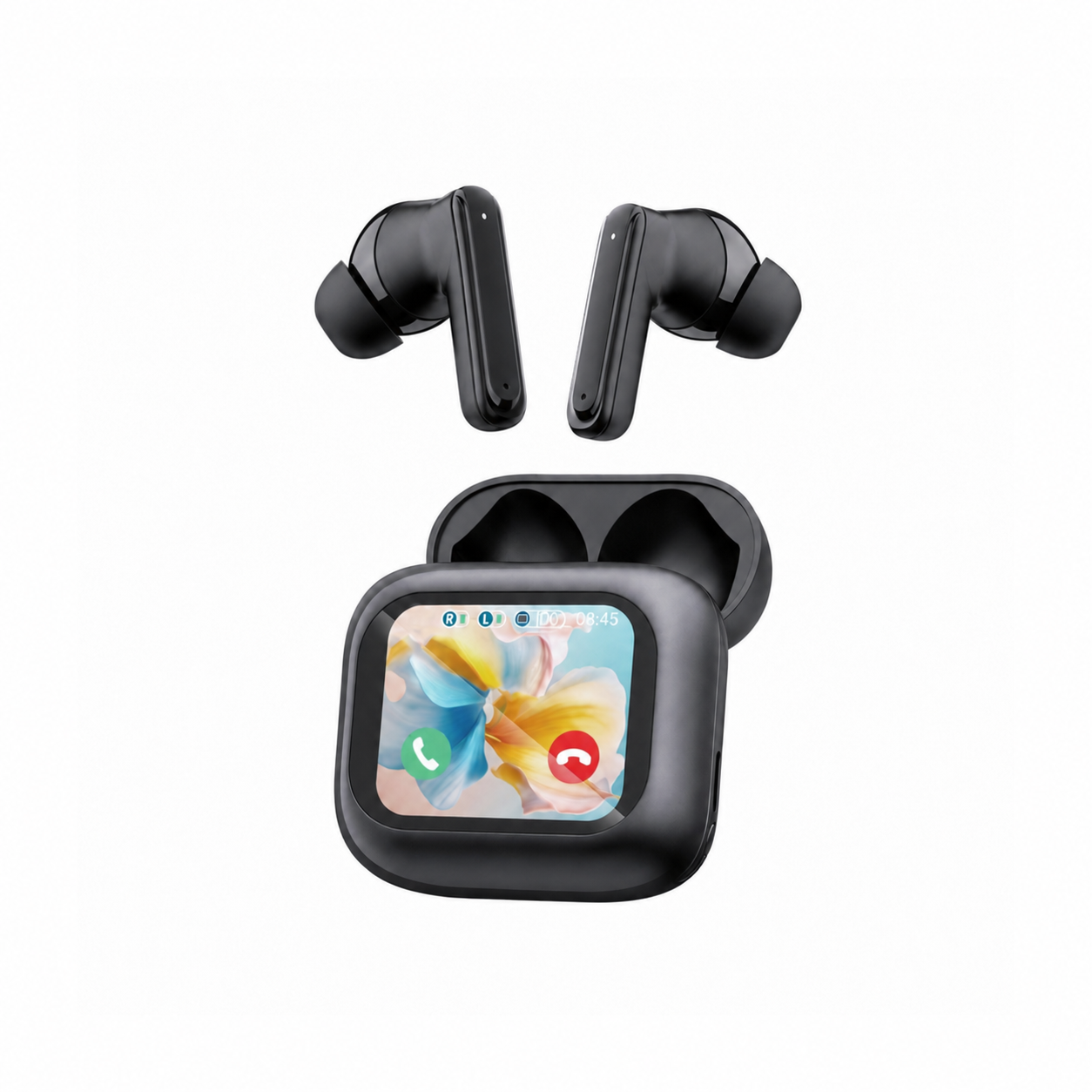
The listing for EARSOLE Smart Wireless Earbuds with LCD Touchscreen Case states a full-color LCD touchscreen charging case that manages music, volume, calls, and settings, Bluetooth 5.4, ANC + ENC noise reduction, and soft silicone tips, while noting that no water-resistance rating is listed. Specifically, according to the EARSOLE store listing (EAR-LCD54-BLK-01):
- Direct LCD touchscreen controls (no companion app required): Manage music playback, adjust volume, handle incoming calls, and navigate settings (in English or Chinese) directly on the charging case’s full-color LCD touchscreen.
- Bluetooth 5.4 with ANC + ENC noise reduction: Pairs over standard Bluetooth 5.4 to phones, tablets, and laptops, combining Active Noise Cancellation (ANC) to reduce steady commute rumble and office hum with Environmental Noise Cancellation (ENC) to clean up voice calls.
- Honest hardware boundaries: The EARSOLE listing does not advertise proprietary aptX or LDAC high-res codecs—so a third-party codec changer app cannot add aptX or LDAC to them—and no water-resistance rating is listed for this model, so you should wipe sweat off after training and keep them out of the rain.
Frequently Asked Questions
Why does Android reset my Bluetooth codec in Developer Options every time my earbuds reconnect?
Whenever your wireless earbuds disconnect and reconnect, Android performs a fresh A2DP profile handshake and reverts to the system’s default negotiated codec and bitrate for that device. As developers and users in r/WirelessEarbuds (thread 1x7smtq) and r/androidapps (thread fy9mto) explain, third-party utilities like Bluetooth Codec Changer and AutoCodec solve this by running a background listener that automatically re-applies your preferred supported codec, sample rate, and bit depth the moment your headphones connect.
Can a Bluetooth codec changer app add aptX or LDAC to earbuds that only support SBC or AAC?
No. According to Wikipedia’s List of Bluetooth profiles, every A2DP Bluetooth audio device must support the baseline SBC codec, while AAC, aptX, and LDAC are optional codecs that must be supported by both the host device and the headphones. As illustrated by users in r/Googlebook (thread 1x420h2) stuck on SBC-only host stacks, if your phone, computer, or earbuds do not support a codec in hardware and firmware, selecting it in Developer Options or a codec changer app will immediately revert to SBC or AAC.
Why did Bluetooth Codec Changer stop switching sample rates after an Android OS update?
Third-party codec changer apps rely on Android system APIs and Developer Options permissions to override A2DP parameters. When a phone installs a major OS update or beta—such as the One UI 8 / Android 16 beta reported by Galaxy S24 Ultra users in r/GalaxyS24Ultra (thread 1mvtmsl)—sample-rate or bitrate switching in apps like Bluetooth Codec Changer can stop working until the app developer releases a compatibility update. Meanwhile, if you simply want app-free control over music, volume, calls, and ANC/ENC settings on a Bluetooth 5.4 daily driver, the EARSOLE Smart Wireless Earbuds with LCD Touchscreen Case puts those controls directly on the full-color LCD touchscreen case (note: no water-resistance rating is listed).
