



If you have ever opened Android Developer Options and spotted the bluetooth avrcp version menu listing 1.3, 1.4, 1.5 (Default), and 1.6, you may have wondered what is bluetooth avrcp and whether switching avrcp 1.5 vs 1.6 improves how your wireless earbuds, speakers, or car stereo behave. According to Wikipedia’s List of Bluetooth profiles, AVRCP works alongside A2DP to control playback on headphones, speakers, and car audio systems across five main versions: AVRCP 1.0 (basic play/pause/stop commands), AVRCP 1.3 (player status and artist/track metadata), AVRCP 1.4 (multi-player browsing, Now Playing lists, search, and Absolute volume), AVRCP 1.5 (specification corrections and clarifications to absolute volume and browsing), and AVRCP 1.6 (folder item counts without downloading the list and cover art transmission).
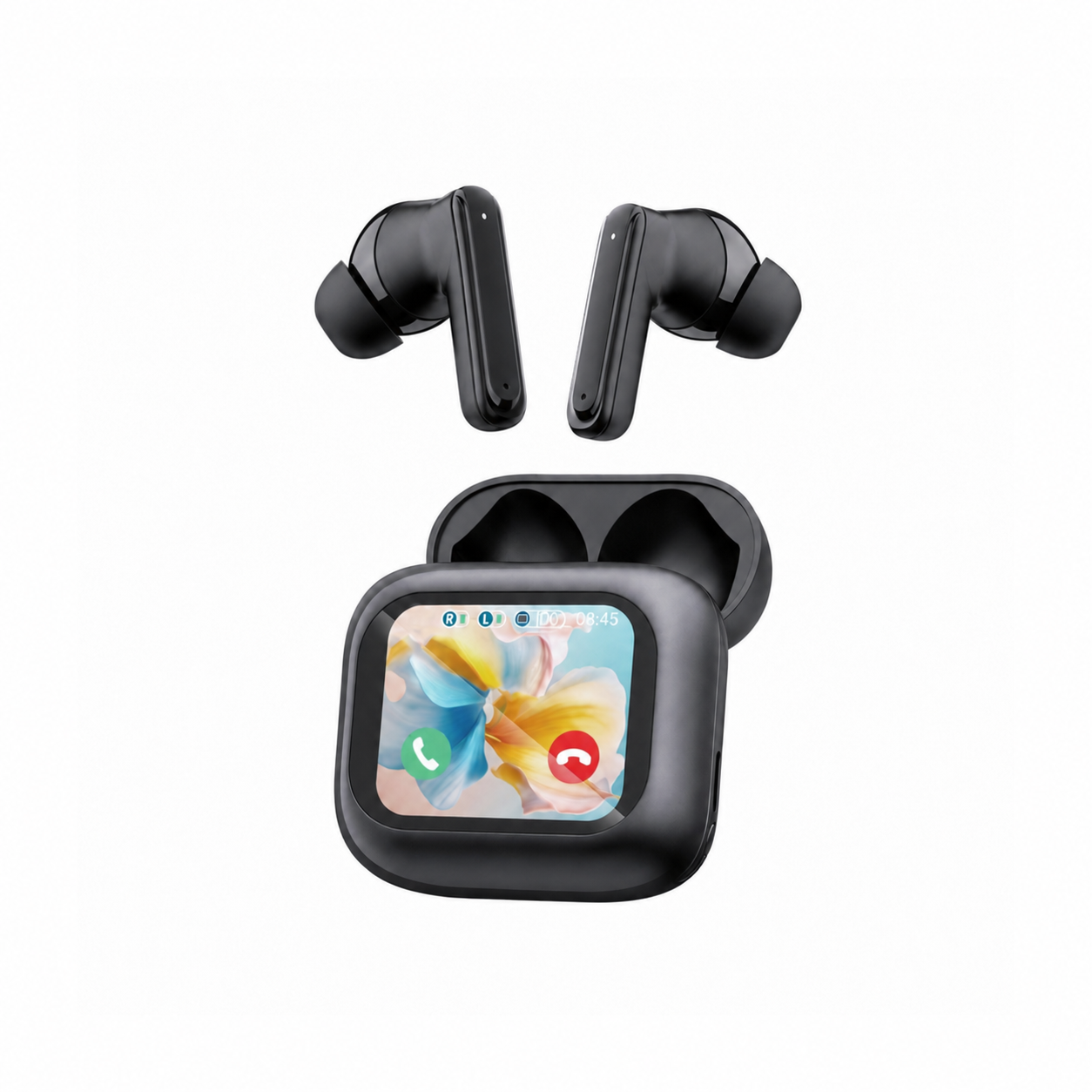
In short, AVRCP does not compress or transmit your music audio—that is the job of the A2DP profile. Instead, AVRCP is the invisible remote-control channel that lets you tap an earbud or touchscreen charging case like the EARSOLE Smart Wireless Earbuds with LCD Touchscreen Case to pause a song, sync your phone and headphone volume sliders into a single bar, and send track titles or album art to a car dashboard. Below, we compare every AVRCP revision from 1.0 to 1.6 and show when switching away from the 1.5 default fixes missing car metadata, erratic volume steps, or Bluetooth headphones connected with no sound.
What Is Bluetooth AVRCP (and How Does It Work With A2DP and HFP)?
When you pair a set of wireless headphones or earbuds to your phone or laptop, Bluetooth does not use a single catch-all connection. Instead, as documented in Wikipedia’s List of Bluetooth profiles, the Bluetooth stack runs three distinct profiles side by side, each handling a separate job:
- A2DP (Advanced Audio Distribution Profile): Streams unidirectional high-quality stereo audio from your phone or computer to your headphones or car receiver using an audio codec (mandatory SBC, or optional AAC, aptX, or LDAC).
- HSP / HFP (Headset Profile / Hands-Free Profile): Handles two-way microphone voice calls, dial commands, and handset status.
- AVRCP (Audio/Video Remote Control Profile): Provides a standard interface to control TVs, Hi-Fi equipment, headphones, wireless speakers, and car audio systems from a single remote control or target display.
Wikipedia notes that AVRCP is “often used in conjunction with A2DP for remote control on headphones, wireless speakers, and car entertainment systems,” and divides every AVRCP connection into two roles:
- The Controller (CT): Usually your headphones, earbuds, smart charging case, or car steering-wheel buttons sending a command (such as Play, Pause, Next Track, or Volume Up) and receiving song metadata.
- The Target (TG): Usually your smartphone, tablet, or computer media player executing that command and sending back track title, artist name, playing time, or album cover art.
AVRCP 1.0 vs 1.3 vs 1.4 vs 1.5 vs 1.6: Feature Comparison Table
Every time the Bluetooth Special Interest Group updated AVRCP, it expanded what your headphones or car display can see and control on your phone. Here is how the versions compare based on Wikipedia’s List of Bluetooth profiles:
| Bluetooth AVRCP Version | Core Capabilities Added | Track Metadata & Album Cover Art | Volume Synchronization (Absolute Volume) | Best Device Match in Android Developer Options |
|---|---|---|---|---|
| AVRCP 1.0 | Basic remote control commands (play, pause, stop, skip) | None | Separate device and phone volume sliders | Legacy early-2000s Bluetooth receivers |
| AVRCP 1.3 | Music player status (playing, stopped) + event notifications for track changes | Sends artist name, track title, and playing time | Separate volume sliders (no Absolute volume) | Older car stereos where 1.5/1.6 hides song titles (r/GalaxyFold) |
| AVRCP 1.4 | Browsing and manipulating multiple media players, Now Playing list, file/folder browsing, and search | Artist, track title, playing time + folder/media browsing | Introduces Absolute volume (single linked volume slider on phone and headphones) | Bluetooth amps or older receivers that drop connections on 1.5 (r/PositiveGridSpark) |
| AVRCP 1.5 (Android Default) | Specification corrections and clarifications to media browsing, Absolute volume, and Unicode support | Text metadata + stabilized browsing | Refined Absolute volume handshake | Best default for most everyday earbuds, speakers, and cars |
| AVRCP 1.6 | Transmits number of items in a folder without downloading the list + album cover art | Text metadata + Cover art images | Full Absolute volume support | Modern Bluetooth 5.x headphones, touchscreen-case earbuds, and newer car displays (r/AynThor) |
Two milestones in that table matter most for everyday headphone users:
- Why AVRCP 1.4 was a turning point: Before AVRCP 1.4, your phone had its own Bluetooth volume slider and your headphones had a separate internal amplifier volume. AVRCP 1.4 introduced Absolute volume, linking both sliders so pressing the volume buttons on your phone or earbuds adjusts the exact same scale.
- What AVRCP 1.5 vs 1.6 actually changes: AVRCP 1.5 did not invent flashy new consumer buttons; instead, Wikipedia explains that 1.5 “corrects and clarifies the specification, especially regarding browsing and absolute volume, and adds support for Unicode.” AVRCP 1.6 then added support for transmitting cover art and reading the number of items inside a media folder without having to download the entire list first.
Should You Keep Default AVRCP 1.5, Upgrade to 1.6, or Downgrade to 1.3/1.4?
According to Android and Windows users in r/GalaxyFold, r/AynThor, r/PositiveGridSpark, and r/techsupport, Android sets AVRCP 1.5 as the default in Developer Options, switching to AVRCP 1.6 can fix compatibility with newer Bluetooth headphones, stepping down to AVRCP 1.4 or 1.3 can fix missing song metadata on older car stereos or unstable amp connections, and a faulty AVRCP driver on Windows 11 can leave remote controls working while muting audio output.
In r/GalaxyFold (thread u16c0h, “Why is AVRCP 1.5 the default and not 1.6?”), a Galaxy Fold3 owner asks: “Hey mates! AFAIK the AVRCP version stands for what a Bluetooth remote control is able to do. In the dev setting of my Fold3, the 1.5 is set as the default. 1.6 should add more stuff like receiving meta-data and so on. Why is 1.6 not the default? Are there disadvantages if I choose 1.6?”
The reason Android keeps AVRCP 1.5 as the factory default comes down to car head-unit compatibility: while modern wireless earbuds handle AVRCP 1.6 effortlessly, millions of cars on the road run older infotainment firmware that chokes when a phone offers an AVRCP 1.6 cover-art handshake. Depending on your symptom, here is which setting real users choose:
1. When to Switch Up to AVRCP 1.6 (Modern Headphones & Touchscreen-Case Earbuds)
If you use modern Bluetooth 5.x headphones or a smart charging case that controls playback and displays status, AVRCP 1.6 unlocks the newest control handshake. In r/AynThor (thread 1x1b6x8), an Android handheld user reports: “If you unlock and go to Developer options -} Bluetooth avrcp version -} avrcp 1.6 all my Bluetooth headphones work properly. By default it’s at 1.5.”
This control channel is also what powers on-case playback management on screen-equipped wireless models like the EARSOLE Smart Wireless Earbuds with LCD Touchscreen Case. The listing for EARSOLE Smart Wireless Earbuds with LCD Touchscreen Case states a full-color LCD touchscreen charging case that manages music, volume, calls, and settings, Bluetooth 5.4, ANC + ENC noise reduction, and soft silicone tips, while noting that no water-resistance rating is listed. When you tap the full-color LCD touchscreen case (available with English and Chinese menus) to skip tracks or adjust volume, your phone and earbuds exchange those playback and volume commands over AVRCP while streaming audio over A2DP. (As the EARSOLE listing notes, no water-resistance rating is listed for this model, so wipe sweat off after training and keep the earbuds and touchscreen case out of the rain.)
2. When to Step Down to AVRCP 1.3 or 1.4 (Older Car Stereos & Unstable Amps)
If your car dashboard suddenly stops showing song titles or your Bluetooth amp keeps dropping its connection, stepping down from 1.5 fixes the mismatch:
- Missing song titles on car screens (Use AVRCP 1.3): In r/GalaxyFold (thread u16c0h), a driver explains why even 1.5 was too new for their vehicle: “I switched back all the way to version 1.3 because in my car I couldn’t see any data of songs only the length, it was annoying, btw my default was also 1.5.” Because AVRCP 1.3 uses the simpler text metadata format without 1.4+ media-folder browsing, older car stereos display artist and track titles reliably again.
- Frequent Bluetooth disconnects on amps/receivers (Use AVRCP 1.4): In r/PositiveGridSpark (thread 1oq5uwb), a user resolved constant Bluetooth drops with a four-step Developer Options tweak: “enable developer options set Bluetooth AVRCP to 1.4 instead of 1.5 default disable Bluetooth A2DP hardware restart the device connection is now stable, no longer have to re-pair devices all the time 👍.”
3. When Remote Controls Work on Windows 11, But No Sound Comes Out
Sometimes an AVRCP driver bug on a Windows PC can interfere with audio playback even when play/pause buttons still respond—a scenario closely related to our guide on Bluetooth headphones connected with no sound. In r/techsupport (thread 1h5d9qp), a Windows 11 user connecting a Bluetooth speaker reports: “However no sound would come out when doing so (despite all remote controls working). My speakers also worked with my other devices flawlessly. I ended up figuring out that the AVRCP driver used by my speaker was at fault (I tested all the other related drivers and services).” Toggling the Bluetooth AVRCP Transport device in Windows Device Manager (or updating the Bluetooth driver) resets the stuck handshake so A2DP audio flows again.
Frequently Asked Questions
Why is AVRCP 1.5 the default in Android Developer Options instead of 1.6?
Android sets AVRCP 1.5 as the system default (as seen in r/GalaxyFold thread u16c0h) because AVRCP 1.5 incorporates official Bluetooth specification corrections and clarifications for media browsing, Absolute volume, and Unicode text (Wikipedia) while maintaining broad backward compatibility with older car stereos. While AVRCP 1.6 adds album cover art transmission and faster folder item counts, some older car infotainment systems fail to parse track metadata when paired at 1.6.
When should you switch Bluetooth AVRCP to 1.3 or 1.4?
You should test AVRCP 1.3 if your car stereo display only shows track length and fails to display song titles or artist names on default 1.5 (a fix confirmed by drivers in r/GalaxyFold thread u16c0h). You should test AVRCP 1.4 if a Bluetooth amplifier or older receiver repeatedly disconnects on 1.5 (as reported in r/PositiveGridSpark thread 1oq5uwb), or if you only need basic Absolute volume and browsing without 1.5/1.6 extensions. Conversely, if modern Bluetooth headphones fail to respond properly on 1.5, switching up to AVRCP 1.6 in Developer Options and restarting your device can resolve the handshake (r/AynThor thread 1x1b6x8).
Does changing the Bluetooth AVRCP version affect sound quality or A2DP codecs?
No. Changing your bluetooth avrcp version only changes the remote-control, track metadata, cover art, and volume-sync protocol between your devices—it does not change the A2DP audio codec (SBC, AAC, aptX, or LDAC) or audio bitrate. On screen-controlled wireless earbuds like the EARSOLE Smart Wireless Earbuds with LCD Touchscreen Case (Bluetooth 5.4, ANC + ENC noise reduction, full-color LCD touchscreen charging case), AVRCP is the profile that lets the case touchscreen and earbuds manage music, volume, and calls while A2DP handles the stereo audio stream.
