



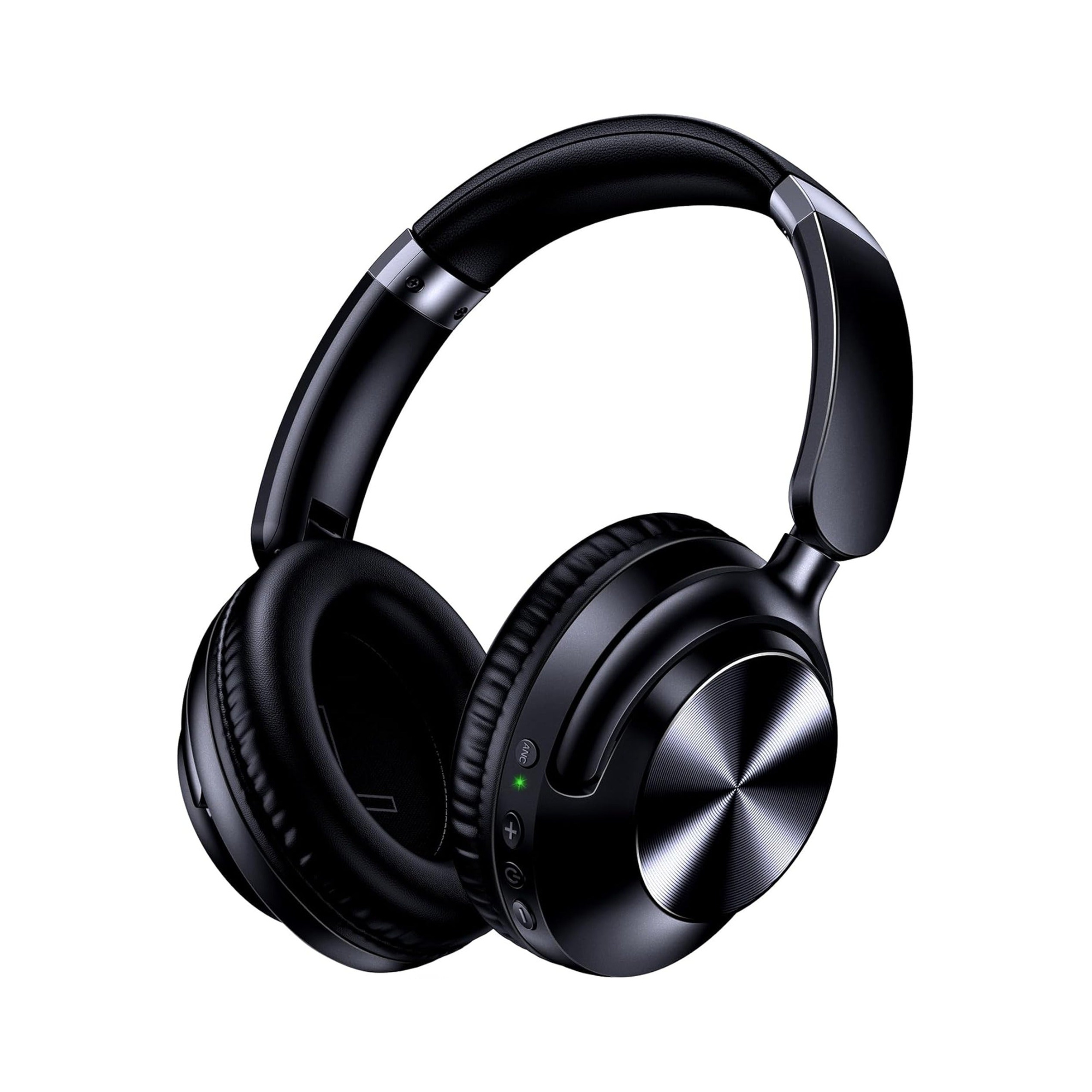
Apple removed the built-in 3.5 mm headphone jack starting with the 10.9-inch 10th-generation iPad, leaving the 2021 9th-generation iPad as the last iPad model with a native 3.5 mm port. If you use a 10th-generation iPad, a modern iPad Air, an iPad Pro, or a 6th-generation iPad mini, the tablet has a single USB-C port and no dedicated analog headphone socket. To listen on any jackless iPad, you can either pair wireless Bluetooth headphones directly for everyday video, music, and calls, or plug a USB-C to 3.5 mm headphone jack adapter into the charging port whenever you need zero-latency wired audio for music creation, rhythm practice, or classroom headphones.
Which iPad Models Still Have a Built-In 3.5mm Headphone Jack?
When shoppers search does ipad have a headphone jack or does the ipad have a headphone jack, the answer depends on a single hardware cutoff in Apple’s tablet lineup. According to AppleInsider’s report on Apple removing the headphone jack from the 10th-generation iPad, the 10.9-inch 10th-generation iPad requires either wireless headphones or a USB-C adapter, completing the transition away from the 3.5 mm headphone connector that Apple began with the iPhone 7 in 2015 and leaving 2021’s 9th-generation iPad as the sole device Apple sold that still retained the built-in 3.5 mm jack.
Because Apple transitioned the iPad Pro, iPad Air, and iPad mini lines to flat-edged USB-C chassis before updating the entry-level iPad, you can tell how your iPad connects to headphones by checking its physical home button and charging port:
- 2021 9th-generation iPad (and earlier base iPads): Includes both a Lightning charging port on the bottom edge and a dedicated 3.5 mm stereo headphone jack on the top edge. Standard 3.5 mm wired headphones plug straight in with no dongle required.
- 10.9-inch 10th-generation iPad: Features an all-screen design with a USB-C port and no built-in 3.5 mm headphone socket. Connecting wired 3.5 mm headphones requires a USB-C to 3.5 mm adapter.
- USB-C iPad Air, iPad Pro, and iPad mini (6th generation): Rely on a single USB-C (or Thunderbolt/USB-C) port with no built-in 3.5 mm audio jack, supporting direct Bluetooth pairing or wired listening via a USB-C to 3.5 mm adapter.
| iPad Model Family | Built-In 3.5 mm Headphone Jack? | Primary Charging & Data Port | How to Connect 3.5 mm Wired Headphones | How to Connect Wireless Bluetooth Audio |
|---|---|---|---|---|
| iPad 9th Generation (2021) & Earlier Base Models | Yes — native 3.5 mm port built into the chassis | Lightning port | Plug a 3.5 mm AUX cable directly into the iPad’s headphone jack | Pair directly in Settings > Bluetooth |
| iPad 10th Generation (10.9-inch, 2022) | No — removed starting with this generation | USB-C port | Plug a USB-C to 3.5 mm headphone jack adapter into the USB-C port | Pair directly in Settings > Bluetooth |
| Modern iPad Air & iPad Pro (USB-C Models) | No — no analog 3.5 mm socket on the frame | USB-C / Thunderbolt port | Plug a USB-C to 3.5 mm adapter (or USB-C audio hub) into the port | Pair directly in Settings > Bluetooth |
| iPad mini (6th Generation) | No — USB-C only chassis | USB-C port | Plug a USB-C to 3.5 mm headphone jack adapter into the USB-C port | Pair directly in Settings > Bluetooth |
That hardware split explains why buyers still weigh the 9th-generation iPad against newer models when wired headphones are part of their daily workflow. In an r/ipadmusic discussion on considering an iPad 9 for its headphone jack, the original poster asked whether iPad Air or iPad Pro owners missed having a built-in headphone jack, and an iPad Pro user replied that they missed the headphone jack terribly because dongles are frustrating when you own several pairs of wired headphones you love.
How to Plug 3.5mm Wired Headphones Into a USB-C or Lightning iPad
If your iPad does not have a built-in 3.5 mm socket—and you are searching for how to plug headphones into ipad—you do not have to throw away your wired headphones. An analog 3.5 mm plug carries left and right audio signals as continuous electrical voltage, whereas a USB-C or Lightning port outputs digital data. To bridge the two, your adapter must contain a tiny digital-to-analog converter (DAC) and headphone amplifier inside the connector housing.
As AppleInsider notes, there are still many situations where a wired connection is better than a wireless one—such as for musicians and people working in education—and for those users Apple sells $9 headphone adapters, one for USB-C and one for Lightning. An AppleInsider reader comment in the same report confirmed that the USB-C to 3.5 mm headphone jack adapter works smoothly on the 6th-generation iPad mini.
Step-by-Step: Connecting 3.5mm Headphones to a Jackless iPad
- Identify your iPad’s charging connector: Check the bottom edge of your iPad. If the port is a symmetrical oval with a thin center tongue, it is USB-C (used on the 10th-generation iPad, modern iPad Air, iPad Pro, and iPad mini 6). If the port is a smaller slot that accepts a reversible 8-pin cable, it is Lightning.
- Attach a matching DAC adapter (sold separately): Plug a USB-C to 3.5 mm headphone jack adapter (for USB-C iPads) or a Lightning to 3.5 mm headphone jack adapter (for older Lightning devices) firmly into the iPad’s port.
- Insert your 3.5 mm headphone plug: Push your 3.5 mm stereo connector all the way into the adapter’s female jack until it clicks flush. iPadOS automatically detects the USB-C or Lightning audio accessory and switches output away from the tablet’s built-in speakers.
- Verify audio output in Control Center: Swipe down from the top-right corner of the iPad screen to open Control Center and check the audio playback card; you will see a headphone icon confirming that sound is routing through the wired adapter.
Why Musicians, Students, and Classrooms Still Keep a 3.5mm Wired Option
Why go to the trouble of plugging in a $9 USB-C to 3.5 mm adapter when every iPad includes built-in Bluetooth? The community responses in both r/ipadmusic and AppleInsider highlight two practical realities where a physical wire outperforms wireless audio:
- Zero-latency monitoring for recording and music practice: Whenever you play a virtual instrument in GarageBand, track vocals over an existing beat, or follow an interactive sheet-music app, your ears must hear each note the exact millisecond your fingers strike the screen or keys. As a commenter in AppleInsider’s discussion explained, the lag from wireless headphones causes what you are recording to fall out of sync with what is playing—and throws off timing when playing guitar, drums, or a keyboard learning app like Simply Piano that relies on a click track and backing track. Another musician in the
r/ipadmusicthread noted that they make music on a bus or plane where Bluetooth simply does not work for live tracking, even though small dongles are easy to misplace or break in a bag. - No-pairing reliability for schools and kids: In AppleInsider’s comment section, a K-8 school executive who purchases hundreds of iPads and parents of young children pointed out that classrooms and families rely on rugged, inexpensive wired headphones that require zero Bluetooth setup, never run out of battery mid-lesson, and are harder for kids to lose than tiny wireless buds.
| Listening Activity on iPad | Recommended Connection Path | Why Latency or Setup Matters | Hardware Needed on a USB-C iPad (10th Gen / Air / Pro / mini 6) |
|---|---|---|---|
| Streaming Movies, YouTube, Podcasts & Music | Wireless Bluetooth | Video apps automatically compensate for Bluetooth buffer delay so lip-sync stays aligned | Bluetooth 5.x earbuds or over-ear headphones paired in iPadOS settings |
| FaceTime, Zoom & Online Study Calls | Wireless Bluetooth or 3.5 mm Wired | Both work cleanly; Bluetooth keeps your desk cable-free while ENC helps call clarity | Bluetooth earbuds with built-in mic, or wired headphones via USB-C adapter |
| GarageBand Recording, Vocal Tracking & Rhythm Apps | 3.5 mm Wired (Direct or via USB-C Adapter) | Wireless Bluetooth lag delays live monitoring and throws recorded tracks out of sync | 3.5 mm AUX cable plugged into a USB-C to 3.5 mm DAC adapter (or 9th-gen iPad jack) |
| Classroom Testing, Flights & Long Study Sessions | Dual-Mode Over-Ear (Bluetooth + 3.5 mm Cable) | Lets you go wireless on the commute and plug in a 3.5 mm cord when batteries run low or rules require a wire | Dual-mode headphones with an included 3.5 mm AUX cable (+ USB-C adapter on newer iPads) |
Bluetooth vs Dual-Mode 3.5mm Headphones on an iPad: Choosing Your Setup
Once you know whether your iPad has a native 3.5 mm port (9th generation and earlier) or a USB-C port (10th generation, iPad Air, iPad Pro, and iPad mini 6), choosing the right pair of headphones comes down to whether you want pure pocketable wireless convenience or dual-mode wireless + 3.5 mm wired flexibility.
Option 1: Dual-Mode Over-Ear Headphones (Bluetooth + Included 3.5mm AUX Cable)
If you use your iPad for both everyday media streaming and zero-lag wired tasks—or if you switch between a USB-C iPad Pro/Air, a 9th-generation iPad, a home stereo, and airplane seatback screens—dual-mode over-ear headphones eliminate the need to buy two separate headsets.
According to the product listing for the EARSOLE Series 127 Noise Cancelling Over-Ear Headphones, the headphones seamlessly switch between wireless Bluetooth connectivity and a 3.5 mm AUX wired connection using the included 47.2-inch audio cable. The EARSOLE Series 127 listing also states Active Noise Cancellation (which reduces up to 95% of ambient noise), up to 100 hours of playtime on a single charge (and 10 hours of music with just a 5-minute fast charge), ultra-soft protein leather ear cups that rotate up to 105 degrees with an adjustable headband, and an included travel pouch.
- On a 9th-generation iPad (or earlier): Plug the included 47.2-inch 3.5 mm audio cable directly into the iPad’s top headphone jack for instant wired audio, or unplug the cable and listen wirelessly over Bluetooth.
- On a 10th-generation iPad, iPad Air, iPad Pro, or iPad mini 6: Pair the Series 127 over Bluetooth for cord-free movies and study sessions, and keep a USB-C to 3.5 mm adapter (sold separately) clipped to the end of the included 47.2-inch AUX cable whenever you open GarageBand or want a zero-lag wired connection.
Option 2: Compact Bluetooth 5.4 Earbuds with On-Case Controls
What if you never record live instruments on your iPad and simply want compact, cord-free audio for Netflix, YouTube, lectures, and video calls without carrying a USB-C dongle? Every modern iPad supports direct Bluetooth audio pairing right out of the box.
According to the product listing for the EARSOLE Smart Wireless Earbuds with LCD Touchscreen Case, the earbuds use a Bluetooth 5.4 connection for music, video, and call playback with compatible devices and pair with a full-color LCD touchscreen charging case that lets you manage music, adjust volume, handle incoming calls, and navigate settings directly from the case (in Chinese or English menus). The listing also specifies ANC + ENC noise reduction, a built-in microphone for calls and online meetings, and an in-ear sports design with soft silicone tips, while noting that no water-resistance rating is listed for this model.
When propped on a desk or folio stand next to an iPad, the touchscreen charging case lets you adjust volume or skip tracks without tapping the tablet screen or interrupting a full-screen lecture video. If you want a quick walkthrough of the first-time pairing menu, see our guide on how to connect wireless earbuds.
| EARSOLE Model | Form Factor | Stated Connectivity | Key Stated Features & Specifications | How It Connects to Your iPad |
|---|---|---|---|---|
| EARSOLE Series 127 Over-Ear Headphones | Foldable over-ear headphones (protein leather ear cups rotating up to 105°) | Dual-mode: Wireless Bluetooth + 3.5 mm AUX wired (47.2-inch cable included) | Up to 95% ANC ambient noise reduction, up to 100 hrs playtime, 5-min fast charge for 10 hrs, adjustable headband, travel pouch | Pairs directly via Bluetooth on all iPads; plugs into 9th-gen iPad’s 3.5 mm jack or into a USB-C to 3.5 mm adapter (sold separately) on 10th-gen/Air/Pro/mini 6 |
| EARSOLE Smart Wireless Earbuds with LCD Touchscreen Case | In-ear true wireless earbuds with soft silicone tips | Wireless only: Bluetooth 5.4 (no 3.5 mm wired jack) | Full-color LCD touchscreen case (music, volume, calls, settings in EN/ZH), ANC + ENC noise reduction, built-in mic; no water-resistance rating listed | Pairs directly via Bluetooth to any iPad (9th gen, 10th gen, Air, Pro, or mini) with no adapter required for streaming, calls, and everyday media |
Frequently Asked Questions
When did Apple remove the headphone jack from the iPad?
According to AppleInsider, Apple completed the removal of the 3.5 mm headphone jack across its new mobile devices with the release of the 10.9-inch 10th-generation iPad in October 2022, leaving 2021’s 9th-generation iPad as the last iPad model sold with a built-in 3.5 mm headphone connector. All newer iPads—including the 10th-generation iPad, modern iPad Air and iPad Pro models, and the 6th-generation iPad mini—use a USB-C port and require either wireless Bluetooth headphones or a USB-C to 3.5 mm adapter.
How do I plug wired 3.5mm headphones into a 10th-generation iPad, iPad Air, or iPad Pro?
As AppleInsider explains, to connect wired 3.5 mm headphones to a 10th-generation iPad, iPad Air, iPad Pro, or 6th-generation iPad mini, you plug a USB-C to 3.5 mm headphone jack adapter (or a Lightning to 3.5 mm adapter on older Lightning devices without a jack) into the tablet’s charging port and insert your headphone cable into the adapter. With dual-mode headphones like the EARSOLE Series 127, you can plug the included 47.2-inch 3.5 mm audio cable directly into a 9th-generation iPad’s built-in jack or through a USB-C adapter on newer iPads, and switch back to Bluetooth when you want wireless listening.
Should I use Bluetooth or a USB-C to 3.5mm adapter on my iPad?
It depends on whether your task is sensitive to wireless audio delay: as iPad users in r/ipadmusic (thread y8ubiu) and AppleInsider’s discussion point out, wireless headphone lag causes live instrument monitoring, vocal recording, or rhythm apps to fall out of sync with the backing track, making a 3.5 mm wired connection via a USB-C adapter (or the 9th-gen iPad’s native jack) essential for music creation. For everyday movie streaming, lectures, and calls where video players automatically sync audio, wireless Bluetooth options—such as the Bluetooth 5.4 EARSOLE Smart Wireless Earbuds with LCD Touchscreen Case or the EARSOLE Series 127 in Bluetooth mode—connect directly to any iPad without a dongle.
